Who owns your church website (and how to take control)

Someone needs the service time changed on the website. Maybe the 10:30 moved to 11:00, or a new midweek group needs adding. The administrator asks around. The pastor doesn't know the login. The treasurer doesn't either. Everyone remembers that a member built the site a few years back, but that person moved away two years ago and nobody has heard from them since. The page still works. Nobody can touch it.
This happens more often than most churches expect, and it's almost always fixable. You just need to check a few things in the right order.
Your church should own the domain name, hold the logins to the registrar, hosting and website, and be able to export the site if you ever leave. If it doesn't, you can usually fix that. This guide shows you what to check, in what order, and what to do if one of the four common problems has already happened to you.
The four things your church needs to control
A website isn't one thing. It's several, and they can each belong to different people. Here they are, in order of how much they matter.
The domain name
The domain is your address. Something like yourchurch.org. It matters more than everything else combined, because whoever is listed as the registrant is the legal owner. Not whoever built the site. Not whoever pays for hosting. The registrant.
If your domain lapses or someone else controls it, your website goes dark and your email may go with it. Getting the domain right is the single most important step. Everything else can be rebuilt. A lost domain sometimes can't be recovered.
The logins
There are three separate logins, and churches often hold only one of them.
- The registrar account. Where the domain is managed and renewed.
- The hosting account. Where the website files live on a server.
- The website admin. The dashboard you log into to change text, like WordPress.
A volunteer might have given the pastor or the administrator the website admin so you can edit pages, while keeping the registrar and hosting to themselves. That feels like access. It isn't full control.
The billing
Domains and hosting renew automatically, usually on a card. If that card belongs to a member who has left, or a treasurer who has moved on, renewals can fail without anyone noticing. The site stays up right until it doesn't.
The content
Finally, the site itself. Your pages, sermons, photos and PDFs. On some platforms you can export all of it and move it anywhere. On others you can't take the site with you at all. We cover that further down, because it's the part churches check last and should check first.
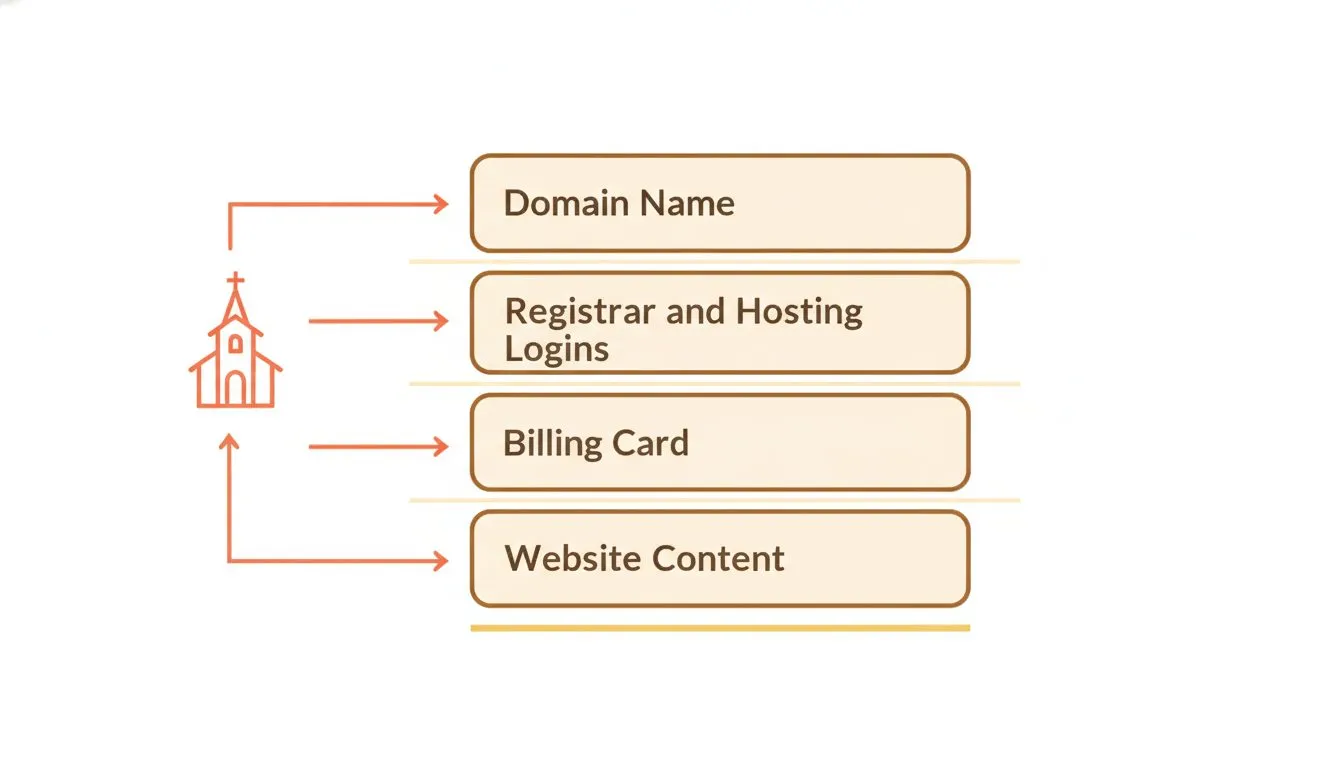
The four separate things your church needs to control, and how they connect.
How to find out where you stand today
You can check most of this yourself in an afternoon. No technical skill needed.
Run a WHOIS lookup on your domain
Search "WHOIS lookup" and enter your domain name. This public record shows who registered it. You're looking at the registrant field.
If it shows your church's name, good. If it shows a person's name, or a privacy service, or the name of an old agency, note that down. A personal name in the registrant field is the thing you'll want to change. If privacy protection hides the details, that's normal and not a problem on its own, but you'll need account access to see behind it.
Find the three logins and who holds each
Work out whether you have the registrar account, the hosting account and the website admin as three separate logins, and who holds each one. Often a church has the website admin and assumes that covers everything. It doesn't. Ask the person who built the site, in plain terms, for all three.
Find out which card is on file
Ask your treasurer what card renews the domain and hosting, and when those renewals fall. If nobody knows, that's a gap worth closing. Check for annual charges on church statements from a registrar or hosting company.
Ask whether you can export the site
Contact your platform or host in writing and ask a direct question: can we export our full website, and in what format? Keep the reply. If the answer is no, or it's vague, you've learned something important before you ever need it.
If your site came from a denomination or diocese
Some churches don't choose their own hosting. The site comes from a diocese, a denominational office, or a regional body, and the domain and hosting sit with that organization rather than with the congregation.
If that's your situation, most of the checks above still apply, but the answers may not be yours to change. Start by asking your denominational office who holds the domain and what happens if the church ever wants to run its own site. It's a reasonable question and worth asking before you need the answer.
The four ways this goes wrong
Nearly every church that loses control hits one of these four. Here's each, and what to do.
1. The volunteer left and nobody has the passwords
The most common one by far. Someone capable set everything up, did it well, and then moved on. The passwords went with them.
Recovery usually runs through the email address on each account, not the password itself. If you can access that email inbox, you can reset the passwords. That's why the email address on file matters far more than any single password. Start there. If the accounts were set up under a church address you can still open, you're most of the way home.
2. The domain is registered to a personal email that no longer works
Harder. Password resets go to an inbox nobody can open, so the normal reset route is closed.
Registrars have account recovery processes for exactly this. They'll ask you to prove the church's connection to the domain, which can mean showing organizational documents, past invoices, or other evidence that the account belongs to your church. It takes patience and paperwork, but it's a defined process. Contact the registrar directly and ask how they handle recovery when the account email is dead.
3. The treasurer changed and the card on file expired
The quiet one. Nobody gets locked out. The renewal just fails, and the domain or hosting lapses in silence.
A lapsed domain is serious. Once it expires and clears any grace period, someone else can register it, and getting it back is not guaranteed. This is the whole argument for putting a church card and a role email on file instead of an individual's. When a person leaves, their card leaves with them. A church account survives the handover.
4. The previous designer holds the domain and wants paying to release it
The hardest, and the one almost nobody writes about. Sometimes the person or company who built the site is listed as the domain's registrant, and releasing it comes with a fee or a delay.
Here's what your church can do calmly. Check the WHOIS registrant details so you know who is actually listed. Gather any written record of what was originally agreed, such as emails, invoices or a contract. Then ask for the transfer in writing, clearly and politely.
Many of these situations are honest disagreements about what was paid for, not anyone behaving badly. But be realistic. If the designer is the registered owner of the domain, this becomes a dispute, and it may be one where your church needs proper advice from someone qualified to give it. That's beyond the scope of this article, and it's worth taking seriously rather than rushing.
What good practice looks like
There's very little published guidance on this. The one serious current source is the General Council on Finance and Administration, the United Methodist Church's finance agency. Their recommendation is sound and worth repeating.
Register the domain in the church's name rather than an individual's, use a dedicated administrative email address rather than a personal one, and keep written records of where everything lives.
Here's the practical version any church can follow, regardless of denomination.
- Register in the church's legal name. Not a member's name, not a designer's.
- Use a role address. Something like admin@ or office@ that survives staff changes, not a personal Gmail account tied to one person.
- Put a church card or account on file. So renewals never depend on one individual's payment method.
- Give at least two people access. One person leaving should never be a crisis.
- Keep one written record. What exists, where it lives, and who can reach it. One document, kept somewhere the church controls.
- Review it once a year. And always when someone leaves.
That's it. Do these and the four failures above mostly stop happening.
If you're building from scratch rather than sorting out an existing site, how to build a church website puts the ownership decision first, where it belongs.
Can you actually take your website with you
This is where platforms differ, and where churches rarely check before signing.
The general principle is simple. A site built on WordPress or another standard system can usually be exported and moved to a different host. A site built inside a proprietary platform sometimes cannot. The pages you see may not be yours to take. See how the hosts compare on ownership and portability in our best web hosting for churches guide.
Two published examples, read as contract terms, with the date noted.
- SolaSites. Their terms state the site cannot be separated, replicated or run independently outside their platform. A church that leaves keeps its own text, images, sermons and PDF files, but not the site itself.
- SteepleMate. Their terms state that on cancellation a church's assets become unavailable and subject to deletion, and no export right appears in the agreement. Their terms also make in-app cancellation the only valid method, so emailing or calling to cancel does not count.
These aren't the only platforms with terms like these, and the point isn't to single anyone out. The point is that you should read your own agreement before you sign it. Look specifically for what happens when you leave.
One more thing worth asking directly. Neither company's terms specify who is listed as the registrant of a domain bought through them. If you register a domain through any platform, ask in writing who the registrant will be. It's a short question with a large payoff.
A short note on Flashcloud
For the sake of clarity, here's how we handle this. The domain we include stays registered to the church, and it stays free for as long as you're with us. Sites are built on WordPress, so they can be exported and moved to any host at any time. You can read more about why we started Flashcloud.
A checklist to run this month
- Run a WHOIS lookup on your domain and note who the registrant is.
- Confirm you can access the registrar, hosting and website admin as three separate logins.
- Check the email address on each account and make sure someone at the church can open it.
- Find out which card renews the domain and hosting, and when.
- Switch billing to a church card and accounts to a role email if they aren't already.
- Make sure at least two people have access to everything.
- Ask your platform in writing whether you can export the full site.
- Write it all down in one document the church controls.
The takeaway
Your church's website should serve your congregation, not sit locked behind someone else's account login. Most churches in this position are fine. They just haven't checked yet. Spend an afternoon working through the checklist above, fix the registrant and the email while things are calm, and you'll never face that moment where nobody can change the service time.
Contract terms were read from each vendor's own website on 2 August 2026.

Neycho Tepavicharov is the co-founder of Flashcloud, with nearly two decades in web hosting behind him and a hosting company he co-founded and sold along the way. He started Flashcloud to make hosting clearer, more generous, and genuinely supportive, and he writes about hosting, performance, how AI is changing the industry, and the occasional strong opinion about where it gets things wrong.
Connect on LinkedIn