Best web hosting for bloggers in 2026
Cut past bloated feature lists to see how five standout hosts handle the speed, growing storage, and human support a serious blog demands.
Your words deserve a home that keeps up with you. Choosing the right web hosting for bloggers shapes how your blog performs, grows, and stays online reliably. Get it right, and the tech fades into the background so you can write. Get it wrong, and you'll spend more time fixing problems than creating.
The best web hosting for bloggers in 2026 is Flashcloud for overall value and a free starter site, SiteGround for WordPress performance, Hostinger for an easy low-cost start, DreamHost for independent ownership and a free starter website, and Kinsta for blogs that have outgrown shared hosting.
This guide walks you through what actually matters, from your first post to your thousandth.
What bloggers actually need from web hosting
Before you commit to any plan, it helps to know what really counts. Flashy feature lists distract from the basics. Here's what genuinely moves the needle for a blog. If you want the general version of this, our guide on how to choose web hosting covers the four questions that decide any hosting choice.
Speed and uptime matter more than you think
A slow blog loses readers before they read a word. Most people leave if a page takes more than a few seconds to load. That's traffic gone, and it won't come back.
Uptime is just as important. Picture the moment a post goes viral. Traffic spikes hard and fast, and that's exactly when your blog needs to stay up. If it buckles under the load, you lose the readers you worked hardest to reach. Search engines notice downtime too, and they rank reliable sites higher.
Look for hosting built for performance from the ground up. If you're curious about your current setup, a website loading speed test shows you exactly where you stand.
Storage and bandwidth for growing content
Every post, image, and comment takes up space. Bloggers feel this quickly because a media library grows relentlessly. High-resolution photos, screenshots, and graphics pile up post after post, and storage that felt generous on day one fills fast. Budget plans often cap these tightly, then charge you when you cross the line.
Bandwidth matters just as much. A single post that suddenly takes off can send a wave of visitors your way, and your plan needs headroom to absorb it without slowing to a crawl.
Good hosting scales with you instead of holding you back.
Support you can reach when something breaks
Something will break eventually. When it does, you want a real person on the other end, not a chatbot looping you through canned answers.
Human support saves hours of frustration. It's the difference between a quick fix and a lost weekend. At Flashcloud, real people answer, and they actually know hosting.

Good hosting fades into the background so you can focus on writing
Types of web hosting and which suits bloggers best
Hosting types can sound confusing, but they don't need to. Here's a plain breakdown of your options and where each one fits.
Shared hosting for new and smaller blogs
Shared hosting is where most bloggers start. Your blog shares a server with others, which keeps things simple and accessible. It's a solid, sensible first step.
For a new blog with modest traffic, shared hosting handles the load comfortably. You get everything you need to publish without the technical weight of managing a server.
As long as your host runs fast, reliable servers, shared hosting carries you a long way.
Managed hosting for bloggers who want less hassle
Managed hosting takes the technical side off your plate. Your host handles updates, security, and performance tuning so you can focus on writing.
Most blogs run on WordPress, so this matters more than you might think. WordPress hosting that's properly managed keeps your site fast and current without you lifting a finger. Things like automatic updates just happen in the background, which also closes the security gaps that spammers and bots love to exploit.
Less hassle means more time creating. That's the whole point.
When to consider upgrading your hosting plan
Some signals tell you it's time to move up. Watch for these:
- Your pages load slower as traffic climbs
- You're hitting storage or bandwidth limits as your media library grows
- Your blog goes down during busy spells or after a post takes off
- You're adding heavy features like a shop or membership area
When any of these hit, a plan with more power keeps things smooth. You might move to VPS hosting for dedicated resources, or higher if you're really scaling. The key is upgrading before problems pile up, not after.
Key features to look for in a blogging host
Not all hosting plans include the same things. Some charge extra for basics that should come standard. Here's the checklist that separates real value from empty promises.
Free domain and starter site included
A domain is your blog's address. Many hosts charge for it yearly, which adds up fast. Flashcloud gives you a free domain for life, so you start strong without paying extra for the basics.
A free starter website helps too. Instead of staring at a blank screen, you begin with a working foundation. That's one less barrier between you and your first post.
One-click installs for WordPress and blogging tools
Getting your blog live should take minutes, not days. Since most blogs run WordPress, a one-click install matters. Set up WordPress or your favorite blogging tool instantly, with no manual downloads and no wrestling with databases.
This matters most if you're non-technical. You click, you wait a moment, and your blog is ready to build. Simple as that.
If WordPress isn't your thing, good hosts support other platforms too, from Joomla to Drupal.
SSL, backups, and security built in
These three protect your blog and your readers without extra effort. An SSL certificate encrypts data and shows visitors your site is safe. If you're unsure why it matters, here's what SSL is and why your site needs one.
Backups save you when something goes wrong. A single mistake or attack shouldn't wipe out years of work. Built-in backups mean you can always roll back.
Security features round it out. Blogs draw comment spam by the bucketload, and every fake comment adds to your moderation load. Good hosting and the right tools filter the worst of it before it ever reaches you. Look for hosting that treats website security as standard, not a paid add-on.
The best hosting options for bloggers
We include ourselves in this list. We also say where we fall short, and every claim about another host comes from that host's own website.
Knowing what to look for is one thing. Knowing which host actually delivers it is another. Here are five strong options, each suited to a different kind of blogger.
1. Flashcloud: best for overall value and inclusions
Flashcloud leads on value and inclusions, which suits bloggers who want the essentials without nickel-and-dime add-ons. You get a free domain for life, a free starter website, hassle-free migration, SSL, backups, and real human support as standard. The honest limitation is that we're newer and smaller than the long-established names.
2. SiteGround: best for WordPress performance and support
SiteGround is a strong pick if WordPress performance and support are your top priorities. It's well regarded for fast, reliable WordPress hosting and knowledgeable help when you need it. The trade-off is price, since it sits at the higher end, especially once introductory rates end.
3. Hostinger: best for an easy low-cost start
Hostinger suits bloggers who want a low-cost, beginner-friendly way to get started. The setup is approachable and the entry price is easy on a new budget, which makes it a comfortable first step. Just know that it works best as a starting point rather than a long-term home as your blog scales up.
4. DreamHost: best for independent ownership
DreamHost appeals to bloggers who value independence. As an independently owned provider, it isn't tied to one of the big hosting conglomerates, and it includes a free starter website to help you get going. The interface is its own thing, so if you're used to standard control panels there's a short learning curve.
5. Kinsta: best for blogs that have scaled
Kinsta is the premium managed option for a blog that has already scaled. If you're pulling serious traffic and want fully managed WordPress with top-tier performance, it delivers. The clear limitation is cost, so it's overkill for a new or small blog and better suited to established sites with the revenue to match.
Here's how the five picks compare on the things that genuinely differ for bloggers:
Host | Free starter website | Free domain | Migration | Best for |
|---|---|---|---|---|
Flashcloud | Yes | Yes, for life | Free, handled for you | Overall value and inclusions |
SiteGround | No | Year 1 | Free plugin, first pro migration free | WordPress performance and support |
Hostinger | No | Year 1 | Free, unlimited | An easy low-cost start |
DreamHost | Yes | Year 1 | WordPress self-serve | Independent ownership |
Kinsta | No | No | Free migrations included | Blogs that have scaled |
Which one should you choose
If you want the most included for what you pay and a starter site built for you, Flashcloud.
If WordPress speed and support are your top priorities and the budget allows, SiteGround.
If you want a low-cost, easy start, Hostinger.
If independent ownership matters to you, DreamHost.
If your blog already earns and the traffic is heavy, Kinsta.
How to migrate an existing blog to better hosting
If you're stuck on slow or overpriced hosting, switching feels daunting. It shouldn't. Modern migration is far smoother than most people expect.
What hassle-free migration actually looks like
A good host moves your blog for you. No downtime, no lost data, no headaches. You keep writing while the technical work happens behind the scenes.
At Flashcloud, hassle-free migration comes built in. We handle the heavy lifting so you don't have to. If you want the full picture, here's what really happens behind the scenes when you switch.
What to check before and after you switch
A short checklist keeps your blog running through the move. Before you switch:
- Back up your entire blog, just in case
- Note your current domain and DNS settings
- List any plugins or custom features you rely on
After you switch:
- Check every page loads correctly
- Test your forms, links, and images from your media library
- Confirm your SSL certificate is active
For a deeper walkthrough, our complete website migration checklist covers every step.
Why switching sooner saves more than you lose
Staying on underperforming hosting has a real cost. Slow load times cost you readers. Downtime costs you trust. Overpriced plans cost you money you could spend elsewhere.
Every month you wait, that cost adds up. Switching sooner stops the bleeding and starts the gains. The short effort of moving pays off quickly.
If your current host is one you're tired of, plenty of bloggers have already moved on. See our guides to the best HostGator alternatives and the best Bluehost alternatives for options that deliver more.
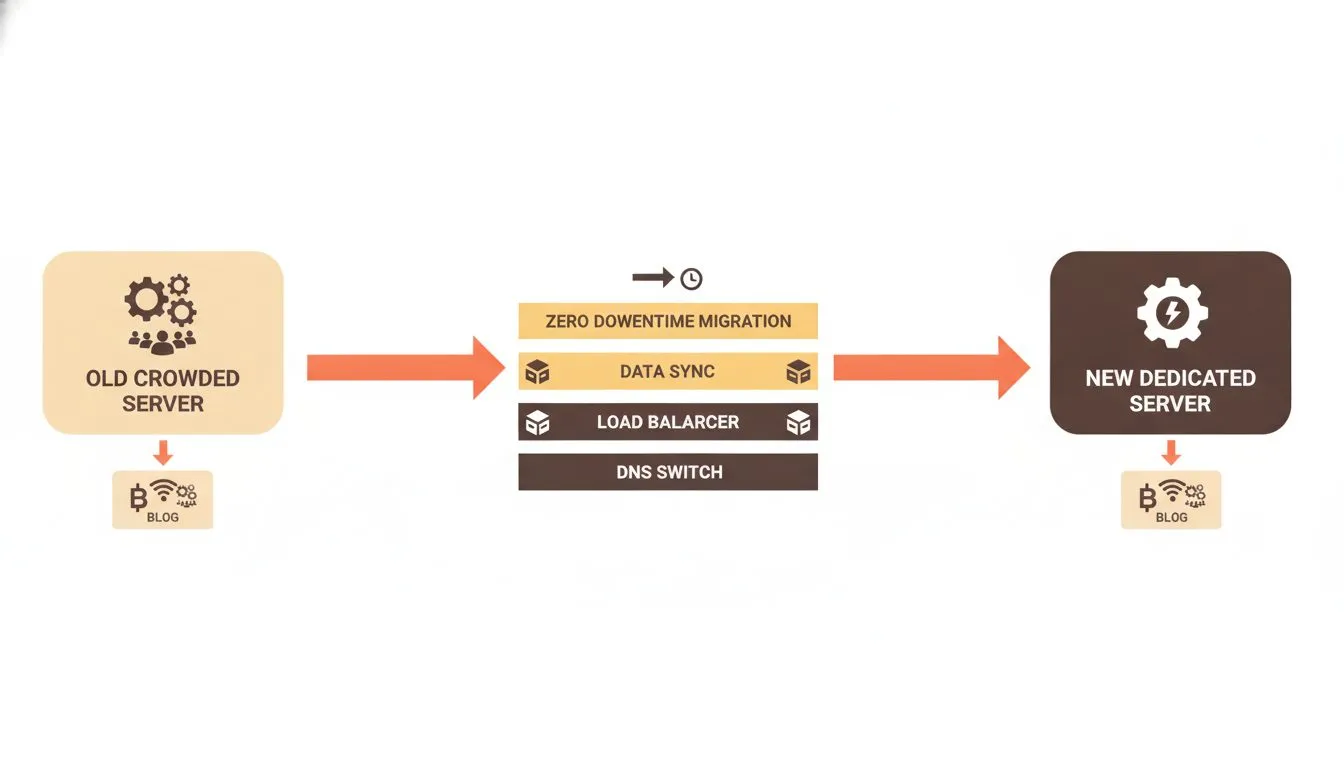
Migration done right means no downtime and no lost readers
Getting the most from your hosting as your blog grows
Your blog today isn't your blog next year. The right hosting grows with you. Here's how to think long term and avoid outgrowing your setup.
Performance tools that keep your blog fast
Speed compounds as your traffic builds. This matters even more once you monetize, because ad and affiliate scripts pile weight onto every page and quietly slow things down. A few tools keep you fast anyway:
- Caching stores ready-made versions of your pages so they load instantly
- A CDN serves your content from locations near your readers, wherever they are
- Fast server hardware handles requests quickly under pressure, including sudden traffic spikes
Not sure whether you need a content delivery network? Here's what a CDN is and whether you need one. Together, these tools keep your blog quick even as your audience grows and your pages carry more scripts.
Scaling your hosting without starting over
Flexible plans let you grow without disruption. You shouldn't have to rebuild your blog every time you level up. The right host lets you scale resources smoothly.
That means no wasted spend on power you don't need yet. And no scrambling when a post goes viral. Check the pricing and make sure the path from small to large is clear and simple.
Growth should feel like an upgrade, not a fresh start.
Building a blog that works for readers and search engines
Good hosting is one part of a stronger overall strategy. Fast, reliable hosting supports your SEO by keeping your site quick and always available. But it works best alongside solid content and smart habits.
Keep your posts helpful and well structured. Maintain your site so it stays healthy, and keep an eye on uptime monitoring to catch issues early. Search engines reward blogs that readers genuinely enjoy.
Want more ideas? Our own blog is packed with practical guidance for creators like you.
Why Flashcloud is built for bloggers
We started Flashcloud because hosting had gotten too complicated and too expensive. Our founders spent nearly 20 years in the industry watching providers overpromise and underdeliver. So we built something better. You can read why we started Flashcloud if you're curious.
The extras others charge for come standard with us. That's what real value looks like. Learn more about us and how we do things differently.
Conclusion
The right web hosting lets your blog grow without getting in your way. It keeps you fast, keeps you online, and keeps the tech out of your hair so you can focus on writing.
Start with what matters: speed, uptime, real support, and the basics included at no extra cost. Choose a host that scales with you, so a viral post or a growing media library never catches you out. And if your current hosting is holding you back, switching is easier than you think.
The best web hosting for bloggers works quietly in your favor. Pick well, and your blog has room to shine. That's exactly what we built Flashcloud to do.

Neycho Tepavicharov is the co-founder of Flashcloud, with nearly two decades in web hosting behind him and a hosting company he co-founded and sold along the way. He started Flashcloud to make hosting clearer, more generous, and genuinely supportive, and he writes about hosting, performance, how AI is changing the industry, and the occasional strong opinion about where it gets things wrong.
Connect on LinkedIn