The risk-free domain migration guide for business owners

Moving your domain does not have to be painful. This guide shows you exactly how to do it right. No downtime. No lost email. No panic when you hit publish.
The truth? A clean move comes down to preparation, not luck. Follow the steps below and you will keep your site running, your inbox full, and your rankings safe.
Why domain transfers feel risky (and why they do not have to be)
Fear of transferring is common. Business owners worry they will wake up to a dead website and a phone full of angry customers. That fear is understandable, but it is almost always misplaced.
Let's break down what actually happens, so the worry stops running the show.
What can actually go wrong during a domain move
The real risks are short and specific. Once you name them, they stop feeling like monsters.
- Downtime if DNS is switched carelessly.
- Email loss if your MX records are not handled properly.
- Ranking dips if URLs change without redirects.
- Broken pages if files or databases are not fully copied when the website moves too.
That's the whole list. Four things. Every one of them is preventable with a plan.
Why most migration horror stories come from bad support
Ask around and you will hear disaster stories. Dig into them and you will find the same cause almost every time: nobody was there to help.
The process itself rarely fails. What fails is a provider who cannot answer a question at the moment you need it. When you are staring at a broken site and support takes three days to reply, that is not a migration problem. That is a support problem.
Good hosts make this easy. Ours includes free migration with real people who do the heavy lifting for you. That single difference removes most of the stress before you even start.
How good preparation removes almost every risk
Anxiety loves a blank plan. A checklist beats anxiety every time.
When you know what to back up, when to lower TTL, and how to test before you switch, there is nothing left to fear. Preparation turns a scary leap into a series of small, boring, safe steps. Boring is exactly what you want here.
The two jobs people confuse
Before you start, get clear on what you are actually doing. There are two separate jobs, and most readers only need one.
Transferring a domain means moving it from one registrar to another. The registrar is who you pay to register the name. Migrating a website means moving your files and databases to a new host. You can do either on its own.
This guide treats the registrar transfer as the main event. If you are also moving the website, there is a clearly marked section for that further down. If you are only moving the domain, you can skip the backup steps for files and databases. You do not need them.
The three 60-day locks you need to know about
This is the part almost nobody warns you about, and it trips up more transfers than anything technical. There are three separate 60-day locks under ICANN policy. Miss one and your transfer gets denied.
- 60 days from registration. A domain usually cannot be transferred within 60 days of being registered. Under ICANN policy this is discretionary, so a registrar is allowed to refuse but not required to. Ask rather than assume.
- 60 days from a previous transfer. If you just moved the domain, you likely cannot move it again for 60 days. This one is also discretionary.
- 60 days from a Change of Registrant. This one is mandatory. The registrar must deny the transfer.
That third lock is the dangerous one, because of what triggers it.
Why updating your contact details can lock you out
A Change of Registrant is triggered by a material change to the registrant name, organization, or email address. Any change to the registrant email address counts.
So updating your contact details before you start a transfer can lock you out for 60 days without you realizing why.
The practical advice, stated plainly: transfer first, then update your details. If you must update them first, some registrars offer an opt-out from the lock, but only at the moment you make the change, never afterward. Hover, for example, shows this as a checkbox reading "Don't apply a 60-day transfer lock to this domain". Whether an opt-out is offered at all is up to the registrar.
Your step-by-step domain transfer guide
Here is the core process. Work through it in order and do not skip ahead. Each step protects the one after it.
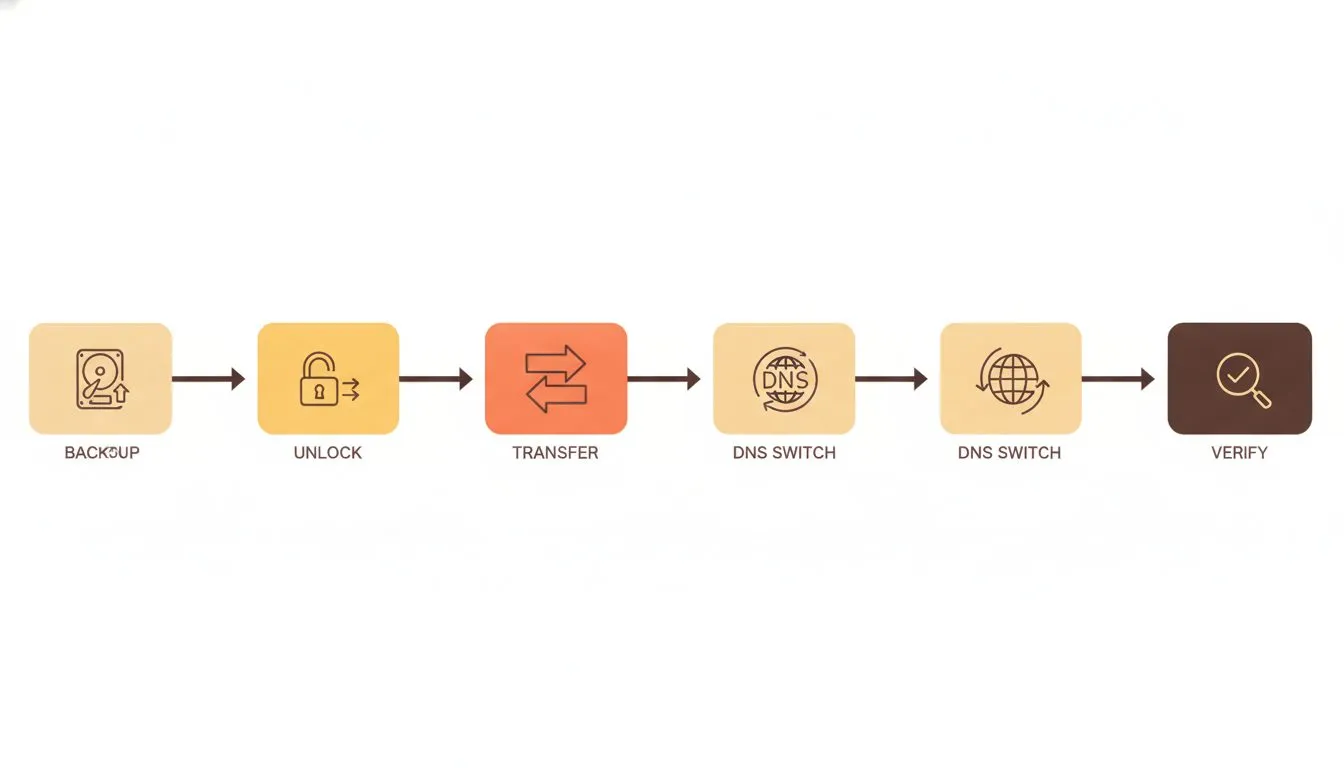
The migration path from backup to go-live, one safe step at a time
Step one: Back up what applies to you
If you are moving the website too, never move without a full backup. If anything goes sideways, this is your undo button. If you are only transferring the domain, you can skip the files and databases and just record your DNS.
Back up all of these that apply:
- Website files - every folder, image, and script (website move only).
- Databases - the engine behind WordPress, WooCommerce, and most modern sites (website move only).
- Emails - export mailboxes so nothing gets stranded.
- DNS records - screenshot or copy your current settings before you change a thing.
Not sure how? Our guide on how to back up a WordPress site walks you through it. Store your backup somewhere off the server, like a local drive or cloud storage.
Step two: Unlock your domain and get your transfer code
To move a domain, you need to unlock it and grab your transfer code. This code is called an EPP code, sometimes called an auth code.
Think of it as the key that proves you own the domain. Your current registrar holds it, and they must hand it over when you ask.
- Log in to your current registrar.
- Turn off the domain lock.
- Request the EPP code, usually sent to your registrant email.
Different registrars hide these settings in different places. Our step-by-step help on getting your EPP code covers the most common ones. There is also a short guide on unlocking a domain for transfer if you get stuck.
Where to find the unlock and code, by registrar
Here is where the unlock and code live at four common registrars, taken from their own documentation.
Registrar | Where to unlock | Where the code is |
|---|---|---|
Porkbun | Domain Management, click the green lock icon to unlock. No waiting period. | Shown on screen under Details, Get Authorization Code. |
Cloudflare | Manage Domains, Manage, Configuration, Unlock. Privacy does not need disabling. | Generated on screen at the point of unlock, with a regenerate option. |
Hover | Control panel, select the domain, Overview, turn off the transfer lock. | Retrieved in the control panel. Note their published warning that email service disconnects once the domain transfers away, so back up mail and line up a new provider first. |
GoDaddy | Domain Portfolio, select the domain, Transfer, Transfer to Another Registrar. Domain Privacy is turned off automatically. Domains with Domain Protection require an identity verification step first. | Shown on screen and emailed to the registrant address. |
None of these four charges a transfer-out fee or makes you raise a support ticket for the code.
One registrar-specific rule worth knowing
GoDaddy states that domains sold as part of a bundle cannot be transferred within 120 days of registration. That is double the ICANN window, and it is GoDaddy's own rule, not an ICANN one. If your domain came bundled with something else, check the date before you plan around 60 days.
Step three: Start the transfer and monitor it closely
Now you begin the transfer at your new host. You enter the domain, submit the EPP code, and confirm the request.
Two things happen next. You will get a verification email you must click, and the transfer will process behind the scenes. Do not ignore that verification email - the move stalls without it.
Domain transfers usually take a few hours to five days, depending on the extension and your old registrar. Your website stays live during this whole window if you handle DNS correctly, which we cover next. Check in on progress, but do not panic if it is not instant. Slow is normal.
Your rights during a transfer
ICANN policy gives you protections that most people never hear about. Knowing them means a slow or awkward registrar cannot push you around.
You do not lose your remaining registration time
People delay transfers because they think they will lose the time they already paid for. You will not. Under ICANN's Transfer Policy, a completed transfer results in a one-year extension of the existing registration period. Your existing expiry carries over, and a year is added on top. There is a ten-year cap on total unexpired term.
A registrar cannot hold your domain hostage over money
ICANN policy states a registrar must not refuse to remove the transfer lock or release the authorization code to you over a payment dispute. A registrar may deny a transfer for non-payment of a past or current registration period, but may not deny it for non-payment of a future period.
And if a registrar has no self-serve unlock, it must remove the lock within five calendar days of your request.
What happens if your old registrar ignores you
If the losing registrar does not respond within five calendar days, the transfer completes by default. Silence is treated as approval under ICANN policy. So a slow or unresponsive registrar cannot block a transfer indefinitely by doing nothing.
A note on country extensions
All of the above applies to gTLDs such as .com, .net, and .org. Country extensions set their own rules. As one example, .uk domains have no authorization code at all and move on an IPS tag instead, which at some registrars means contacting support rather than doing it yourself. Check your extension's rules before assuming the timeline above applies.
How to keep your website live during the move
If you are moving the website to a new host as well, this is the part people fear most. The good news? Zero downtime is entirely achievable. It comes down to timing and testing. If you are only transferring the domain and leaving the website where it is, you can skip this section. For the hosting side of the move in full, our guide to switching web hosting walks through the whole process.
Lower your TTL settings before you begin
TTL stands for Time To Live. In plain terms, it tells the internet how long to remember your DNS settings before checking again.
A high TTL means the old settings stick around longer. A low TTL means changes spread fast. Lower your TTL to 300 seconds a day or two before you switch. That way, when you point your domain to the new host, the change goes live in minutes instead of hours.
Want the full picture on how this works? Read what DNS is and how the internet finds your site.
Use DNS propagation tools to track your records going live
Once you switch, you can watch the change spread across the world in real time. This removes the guesswork.
Free propagation tools show whether your new records are live in different regions. When most locations show your new host, you know the move has landed. If you are curious about timing, our note on how long DNS propagation takes sets clear expectations.
Test your site on the new host before switching DNS
Here is the trick that removes nearly all risk. You can preview your site on the new host before you change a single public setting.
You do this with a quick edit to your computer's hosts file. It tells only your machine to load the new server, while the rest of the world still sees the old one. You get to click around, test pages, and confirm everything works before going public.
We wrote a simple walkthrough on previewing your site before the DNS switch. If it looks perfect in preview, you can switch with total confidence.
Protecting your email, SEO, and business data during migration
These are the three things business owners lose sleep over. Handle them with care and there is nothing left to worry about.

Three areas to guard closely: email, rankings, and your data
Move your email records carefully to avoid lost messages
Email lives on separate DNS entries called MX records. If you move the website but forget the mail, messages can vanish or bounce.
Do this to keep email flowing:
- Set up your mailboxes on the new host before switching DNS.
- Copy your MX records exactly, or use the ones your new host provides.
- Export old mail so no messages are left behind.
Our guide on moving your email from another provider covers the details. It is worth doing slowly. Lost email is the one mistake customers notice fast.
Keep your search rankings intact with 301 redirects
If your URLs stay the same, your rankings usually stay put too. A domain transfer alone does not hurt SEO.
Redirects matter when addresses change - for example, if you move from HTTP to HTTPS, or restructure pages. A 301 redirect tells search engines a page has moved permanently, passing its ranking value to the new location.
Set them up so no visitor or search engine hits a dead end. Our help on redirecting URLs on your site shows you how. Get this right and Google barely notices the move.
Confirm your SSL certificate carries over or renew it fast
Your SSL certificate is what puts the padlock in the browser and the S in HTTPS. Visitors trust it. Search engines expect it.
After migration, check that HTTPS is live and not throwing warnings. If the certificate did not carry over, install a fresh one right away. Most quality hosts issue SSL automatically, so this is usually quick.
New to how this works? Read what an SSL certificate is and why your site needs one. Then confirm the padlock is showing before you tell anyone the site has moved.
What to do after your domain transfer is complete
The transfer finishing is not the finish line. A few final checks confirm everything works the way it should.
Run a full post-migration checklist before going public
Do not just glance at the homepage. Click through the site like a customer would.
Verify each of these:
- Forms - submit a test and confirm it arrives.
- Links - check menus, buttons, and internal pages.
- Email - send and receive from your business address.
- Checkout - run a test order if you sell online.
- Speed - confirm pages load quickly on the new host.
For a deeper version, our complete website migration checklist leaves nothing out. Ten minutes here saves a week of surprises.
Update your domain registration details and auto-renew settings
A live site is worthless if the domain expires. Now is the time to update your contact details, because you are safely past the transfer. Doing it now avoids triggering that 60-day Change of Registrant lock right when you need to move.
- Confirm your contact details are current.
- Enable auto-renew so the domain never lapses.
- Turn the domain lock back on for security.
Forgetting to renew is one of the most avoidable disasters there is. See what happens if you forget to renew your domain if you want the cautionary version.
Contact your new host if anything looks off
If something feels wrong, do not wrestle with it alone. This is exactly what support is for.
Real human support should fix issues fast, not send you a link and disappear. That is the standard we hold ourselves to. Reach out through how to get help and contact support and a person will sort it with you.
That kind of backup is a big part of why we started Flashcloud. Hosting should feel supported, not lonely.
Move with confidence, not crossed fingers
A domain transfer is a process, not a gamble. Follow the steps here and you will move without losing a thing.
Mind the 60-day locks. Back up what applies to you. Unlock and transfer. If the website is moving too, lower your TTL and test before you switch, then protect your email, redirects, and SSL. Run your final checks and lock in auto-renew last. That is the whole game.
You do not have to do it alone either. A clean move pairs perfectly with a host that handles the hard parts for you. Explore our web hosting and free migration, and make your next move an easy one.
Methodology: ICANN Transfer Policy and registrar documentation were read in August 2026.

The Flashcloud team shares hosting know-how, product news, and honest guidance to help you get the most from your website.
Connect on LinkedIn