How to switch web hosting without breaking your site

Switching web hosts means copying your site to a new server, checking it works, then pointing your domain at it. Done in the right order, your visitors barely notice. The whole process usually takes a day or two, and most of the real work is your new host's job, not yours.
Switching hosts feels riskier than it actually is. The fear is that you'll click something, your site will vanish, and there'll be no way back. That's a reasonable thing to worry about. It's also not how a proper move works.
Here's the thing most guides skip: you don't do this often. Most people move hosts once every few years, if that. So if you feel like you should already know how it works and you don't, that's completely normal. Nobody keeps this knowledge fresh.
This article is the calm, complete answer. When it's time to leave, how to choose where to go, what actually happens during the move, and how to do it without breaking anything. We'll hand off to more detailed guides where it helps, so you can go as deep as you need.
When it's time to switch
There's rarely one dramatic moment. It's usually a slow build of small frustrations until one day the maths stops making sense. Here are the honest signals that a move is worth considering.
- The renewal price jumped. The intro rate was fine. The renewal wasn't, and the value stopped keeping up with the cost.
- Support stopped being useful. You wait longer, the answers are vaguer, or an automated system stands between you and anyone who can actually help.
- The site got slower and nobody had an answer. If your pages drag and your host shrugs, that's telling. Run a website loading speed test and read what it tells you, and if you're not sure why things are slow, our guide on why your website is so slow helps you narrow it down.
- Features you assumed were included turned out to be add-ons. Backups, SSL, a bit of security. Things you thought came with the plan, billed separately.
- The company changed hands. An acquisition often means new billing, new policies, and a service that no longer feels like the one you signed up for.
Downtime matters too. If your site keeps dropping and you've no visibility into why, uptime monitoring gives you the evidence to decide.
One honest note before we go further. Not every frustration justifies a move. A host you're genuinely happy with is worth keeping, and moving takes effort. Weigh whether the problem is the host or something you can fix where you are. We'll come back to that at the end.
How to choose where to go
This is where most of the real decision sits. Pick well here and the rest is mostly logistics. Rush it and you might be doing this again in a year.
What the price actually is
The number that matters is the renewal, not the intro rate. Introductory pricing is designed to look attractive for the first term and then step up. Work out what you'll pay over two or three years, not just the first few months.
Value isn't the lowest figure either. It's what you get for what you pay, over time, with nothing quietly bolted on later. Our guide to what best value web hosting actually means unpacks how to read past the headline number.
What's included versus billed later
Ask exactly what comes with the plan and what's extra. The usual suspects that arrive as separate line items:
- The domain itself, and its renewal
- Backups, and whether you can actually restore from them
- Migration of your existing site
- SSL certificates so your site loads over HTTPS
- Email accounts on your domain
None of these are exotic. A good host treats them as standard, not as upsells.
Whether a person will help when something breaks
At some point something will break, or you'll have a question that doesn't fit any article. What you want to know is whether you can reach a real person who can actually fix it, without being routed through a chatbot first. This is hard to judge from a marketing page, so test it.
How to test before you commit
You can learn a lot before you move a single file. Ask support a genuine question and see how they respond. Check how the control panel feels. Look at what the guarantees really cover. Our walkthrough on how to actually test a web host before you commit gives you a practical way to do this.
What actually happens during a move
The mechanics are simpler than the anxiety suggests. Here's the whole thing in plain terms.
Your new host copies your files and your database and sets everything up on their servers. Nothing has changed for your visitors yet. Your live site is still running at your old host exactly as it was.
You then check the copy on a temporary address, one that only you use, to confirm it looks and works right. Once you're happy, your domain is pointed at the new server. The internet gradually updates its records, and traffic starts arriving at the new copy instead of the old one.
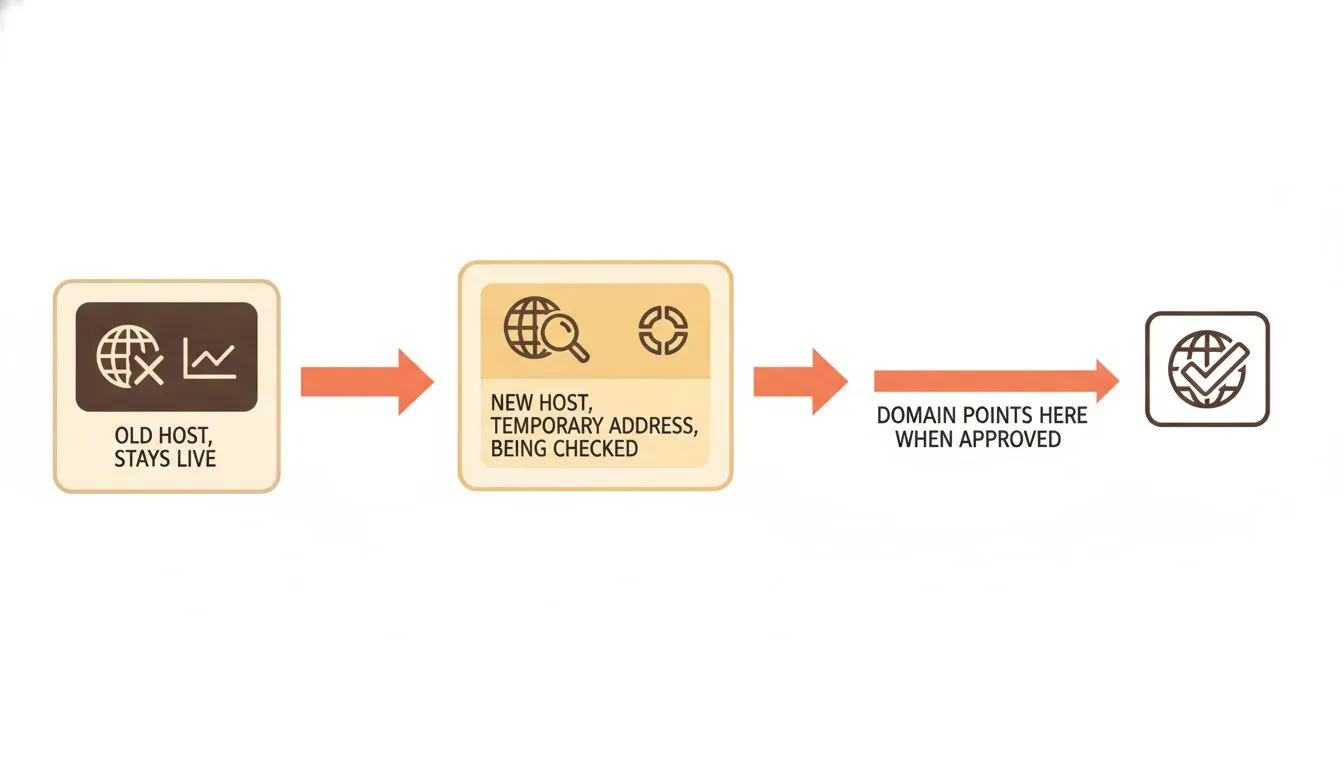
Your original site stays live the whole time. The copy is built and checked before anything points at it.
That's the short version. If you want to see exactly what happens step by step behind the scenes, we've written it up separately in what really happens when you switch web hosting.
The three things people worry about
Almost everyone moving hosts has the same three fears. They're all reasonable, and they all have clear answers.
Will my site go down?
Your original site stays live at your old host for the entire process. The copy sits on a temporary address until you approve it, so nothing about your live site changes while the work happens.
After you point your domain across, there's a short window where the internet is still updating its records. During that window, some visitors may reach the new copy and some may still reach the old one. Both work, because both exist. Nobody hits a broken page. This is why you keep the old copy running a little longer, which we'll get to.
Will I lose anything?
A proper migration copies your files, database and email. It doesn't move them. The original stays exactly where it is, untouched, until you say go. So there's no moment where your only copy is in transit.
Even so, take your own backup first, every time, no exceptions. It costs you a few minutes and it means the decision is fully in your hands. A backup you didn't need is far better than one you wished you had.
Will I end up paying two hosts at once?
This is the one most people don't think about until the bill lands. Nearly every host tells you to keep the old account running through the move, which is sensible advice, but it means you're paying both providers for the overlap.
This is the one place we'll mention ourselves properly. At Flashcloud, we match whatever unused time is left on your old host, up to six months, and add it to your plan free. So the overlap doesn't cost you twice. That's the whole pitch, and now we'll move on.
How to switch, step by step
Here's the whole process as a checklist. Each step is short here on purpose.

The whole move in six steps. Each one has more to it, but this is the order that keeps you safe.
- Back up everything first. Files, database and email. Do this even if your new host is handling the move.
- Choose your new host. Focus on renewal price, what's included, and whether real help is available.
- Let them migrate you, or move it yourself. A good host will do the copying for you. If you'd rather do it manually, that's fine too.
- Check everything on the temporary address. Click through your pages, forms and any checkout before anything goes live.
- Point your domain. Only once you're happy the copy works. Then let the records update.
- Cancel the old account, once you're sure. Not a moment before, and check whether they owe you a refund.
Each of these has more to it than a single line. Our complete website migration checklist walks through every step in detail.
What to do after the move
The move isn't finished when the domain points across. It's finished when you've confirmed everything actually works on the real domain. Almost nobody writes this part down, and it's where the last surprises hide.
- Check every page, form and checkout on the live domain. Not the temporary address. The real one, as a visitor sees it.
- Confirm email is arriving. Having mailboxes set up isn't the same as mail landing in them. Send a test in and out.
- Confirm SSL is active. Your pages should load over HTTPS with no warnings. If you're unsure what that padlock actually does, our guide to what an SSL certificate is and why your site needs one explains it.
- Only then cancel the old account. And check whether they owe you a refund for unused time.
- Don't cancel a domain by mistake. If your domain was registered at the old host, cancelling hosting can be different from cancelling the domain. Be careful which one you're ending. If the domain is moving too, our risk-free domain migration guide covers that separately.
Leaving a specific host?
If you already know which host you're leaving, we've written a focused guide for each of the common ones. These carry current pricing taken from each provider's own site, which is why the figures live there and not in this evergreen article.
- HostGator - a renewal that depends on a term you chose years earlier. Best HostGator alternatives
- Bluehost - renewal prices published for the 36-month term only. Best Bluehost alternatives
- Hosting.com - backups capped at 50 GB on plans selling 100. Best Hosting.com alternatives
- IONOS - the intro rate ends at 12 months whatever term you signed. Best IONOS alternatives
- GoDaddy - the SSL renews at $119.99 a year on the entry plan. Best GoDaddy alternatives
- Hostinger - four years paid upfront for the headline rate. Best Hostinger alternatives
- FastComet - a fixed-renewal promise that's no longer in the terms. Best FastComet alternatives
- HostPapa - four renewal rates, and you only see them in checkout. Best HostPapa alternatives
- SiteGround - a $2.99 rate that renews at $17.99. Best SiteGround alternatives
- ScalaHosting - the advertised price is for a different control panel. Best ScalaHosting alternatives
- DreamHost - transfers, malware repair and custom builds all cost extra. Best DreamHost alternatives
When switching isn't the answer
Sometimes the problem isn't the server. It's the site. A pile of heavy plugins, images that were never resized, a theme trying to do far too much. Move all of that to a faster server and you've just moved the same problem to a nicer address.
Before you commit to a migration, check the site itself. If it's slow, find out why. Our guide on why your website is so slow helps you tell whether the bottleneck is your host or your setup. If it's the setup, fixing it is cheaper and faster than moving, and it'll still help you after you move if you decide to anyway.
Ready to move?
Switching hosts doesn't have to be stressful. With the right plan and the right partner, your site moves cleanly and comes back faster than before. If you'd like us to handle the whole thing for you, take a look at our free migration and let our team do the moving while you carry on with your day.

Neycho Tepavicharov is the co-founder of Flashcloud, with nearly two decades in web hosting behind him and a hosting company he co-founded and sold along the way. He started Flashcloud to make hosting clearer, more generous, and genuinely supportive, and he writes about hosting, performance, how AI is changing the industry, and the occasional strong opinion about where it gets things wrong.
Connect on LinkedIn